

Payment Flow with Stripe
This guide explains how to implement the payment flow using Stripe and the Billing SDK.Setting Up Stripe Payment
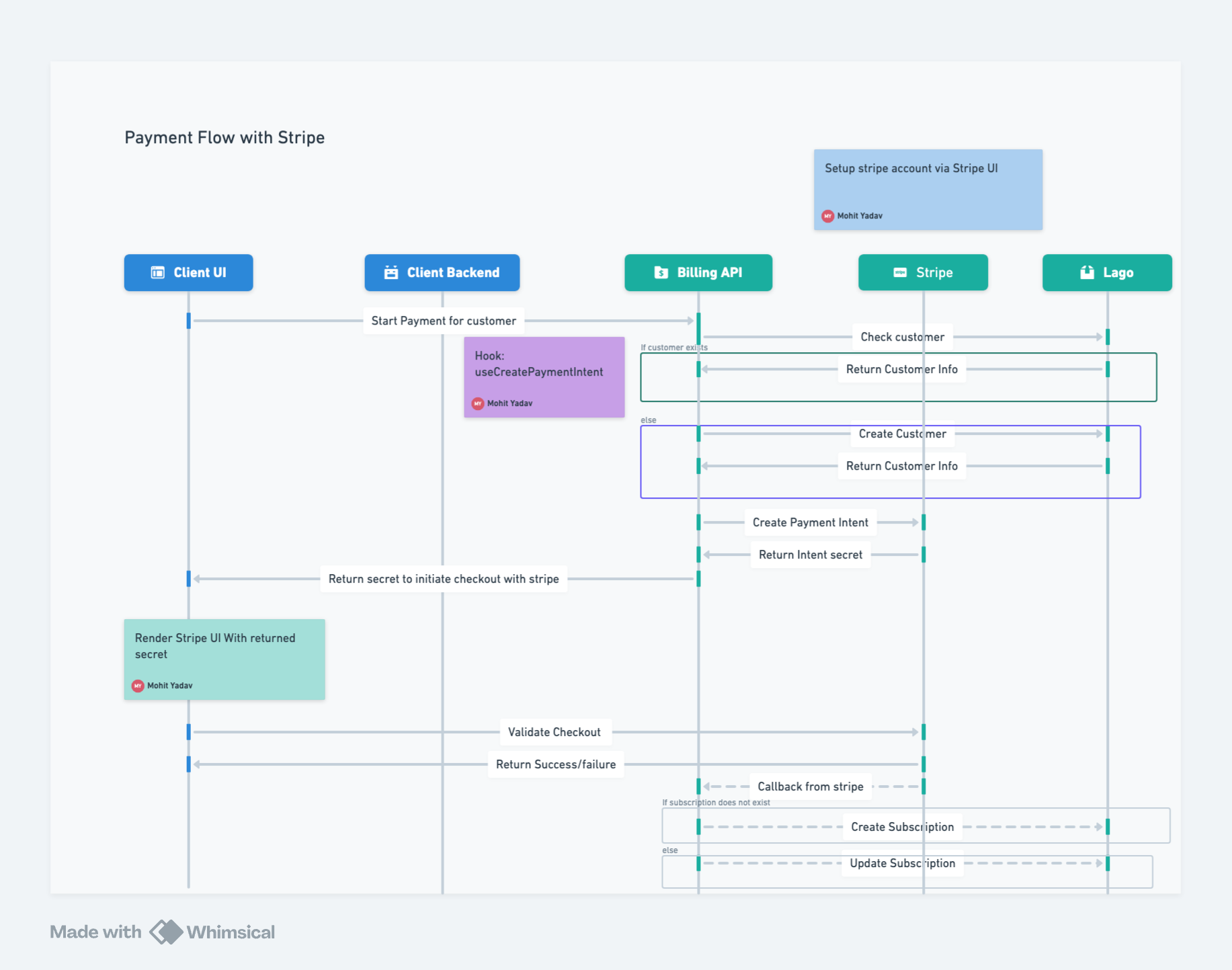
1
Client Initiates Payment Intent
The client uses the useCreatePaymentIntent hook to initiate a payment intent, forwarding the request to the Billing API.
2
Billing API Checks Customer
The Billing API checks if the customer exists in Lago. If yes, it returns the customer information; if not, it creates a new customer and returns the information.
3
Forward Customer Info to Stripe
The Billing API forwards the customer information to Stripe.
4
Stripe Returns Secret
If the information is valid, Stripe returns a secret which is passed back to the client UI.
5
Render Embedded Checkout Form
The client UI renders the EmbeddedCheckoutForm from the Billing SDK.
6
User Completes Payment
The user fills in the required information. This information, along with the secret, is sent to Stripe, which then redirects the client to the success/failure page.
7
Stripe Callback to Billing API
Once the flow completes, Stripe returns the payment information to the Billing API via a callback URL.
8
Update Subscription in Lago
Based on the information from Stripe, the Billing API creates or updates the subscription in Lago.